

Title: Mastering Microsoft Excel: A Guide to Troubleshooting and Preventing Common Errors
Microsoft Excel is a powerful spreadsheet software used by millions worldwide, but its extensive features also make it prone to errors. In this guide, we’ll explore common errors, how to troubleshoot them, and tips for preventing future mishaps.
Common Errors in Microsoft Excel
- Data Entry Errors:
- Occur when data is incorrectly inputted or values are mistyped.
- Use ‘Data Validation’ to specify data types and double-check entries.
- Formatting Errors:
- Arise from accidental reformatting or deletion of cells/formulas.
- Utilize ‘Format Painter’ to copy formatting and ‘Unformat’ to remove it.
- Regularly save work and employ the ‘Undo’ feature.
- Calculation Errors:
- Result from incorrect formula application or entry.
- Double-check formulas, use ‘Formula Auditing,’ and save regularly.
Frequently Asked Questions
1. What is the #VALUE! Error in Microsoft Excel?
- Occurs when a formula contains incorrect data types or is mistyped.
- Identify and correct the data type or formula causing the error.
2. What is the #REF! Error in Microsoft Excel?
- Appears when a formula references an invalid cell address.
- Identify and rectify the invalid cell address in the formula.
3. What is the #NAME? Error in Microsoft Excel?
- Arises when a formula contains an unrecognized or invalid name.
- Identify and correct the invalid name in the formula.
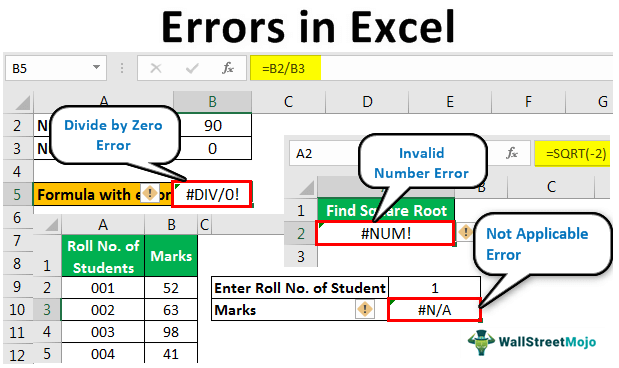
4. What is the #NUM! Error in Microsoft Excel?
- Occurs when a formula contains an invalid or unrecognized number.
- Identify and adjust the incorrect number in the formula.
5. What is the #DIV/0! Error in Microsoft Excel?
- Appears when a formula attempts to divide by zero.
- Identify and rectify the division operation or divisor causing the issue.
6. What is the #NULL! Error in Microsoft Excel?
- Occurs when a formula contains two ranges without a valid operator.
- Identify and correct the formula or operator causing the error.
Conclusion
While Microsoft Excel errors may seem daunting, mastering the basics can help troubleshoot and prevent most issues. Regularly save your work, back up data, and leverage features like ‘Undo,’ ‘Format Painter,’ and ‘Formula Auditing.’ Staying updated on software and familiarizing yourself with Excel’s features ensures a smooth experience.
Excel formula error codes and fixes
Tag: Excel Troubleshooting, Common Spreadsheet Errors, Preventing Excel Mistakes, Formula Auditing, Microsoft Excel Tips.
BEST SELLING PRODUCTS
-
Product on sale
 Windows 11 Professional for 1 PC – RetailOriginal price was: $249.$5Current price is: $5.
 -
Product on saleWindows 10 Professional for 1 PC – RetailOriginal price was: $249.$5Current price is: $5.
-
Product on saleGenuine Office 2019 Professional Plus NOT BindOriginal price was: $249.$27Current price is: $27.
-
Product on saleMicrosoft Windows 10 / 11 Pro – OEMOriginal price was: $178.$12Current price is: $12.
-
Product on saleOffice 2021 Professional Plus License for Windows NOT Bind to MS AccountOriginal price was: $259.$39Current price is: $39.
-
Product on saleGenuine Office 2021 Professional Plus for Windows PC / Laptop – Phone ActivationOriginal price was: $259.$8Current price is: $8.
-
Product on saleOffice 2021 Professional Plus License for Windows For 5 PC / Laptop / Device NOT Bind to MS AccountOriginal price was: $259.$59Current price is: $59.
-
Product on saleWindows 10 Professional or Windows 11 Professional Genuine License key can be used on 5 PC or devicesOriginal price was: $249.$27Current price is: $27.
-
Product on saleMicrosoft Office 2021 Home & Business product key -Lifetime Activation for Mac OS (1MAC)Original price was: $249.$49Current price is: $49.






