
1. Open Office Application ( Word / Excel / etc. )

2. Click Account Menu

3. Click Change License Button
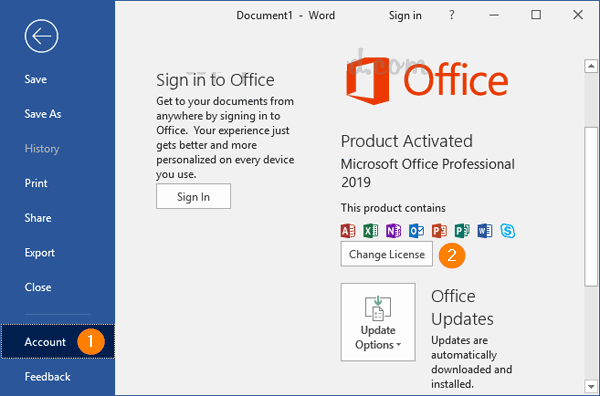
4. Enter Product Key Instead

5. Click Activate Product Icon

6. Choose “I Want Activate the Software By Telephone” if your Product Key is Phone Activation Key

Then you can see this link for activation by phone :
How-to-activate-office-visio-project-by-phone-activation
BEST SELLING PRODUCTS
-
Product on sale
 Windows 11 Professional for 1 PC – RetailOriginal price was: $249.$5Current price is: $5.
 -
Product on saleWindows 10 Professional for 1 PC – RetailOriginal price was: $249.$5Current price is: $5.
-
Product on saleGenuine Office 2019 Professional Plus NOT BindOriginal price was: $249.$27Current price is: $27.
-
Product on saleMicrosoft Windows 10 / 11 Pro – OEMOriginal price was: $178.$12Current price is: $12.
-
Product on saleOffice 2021 Professional Plus License for Windows NOT Bind to MS AccountOriginal price was: $259.$42Current price is: $42.
-
Product on saleGenuine Office 2021 Professional Plus for Windows PC / Laptop – Phone ActivationOriginal price was: $259.$8Current price is: $8.
-
Product on saleOffice 2021 Professional Plus License for Windows For 5 PC / Laptop / Device NOT Bind to MS AccountOriginal price was: $259.$59Current price is: $59.
-
Product on saleWindows 10 Professional or Windows 11 Professional Genuine License key can be used on 5 PC or devicesOriginal price was: $249.$27Current price is: $27.
-
Product on saleMicrosoft Office 2021 Home & Business product key -Lifetime Activation for Mac OS (1MAC)Original price was: $249.$49Current price is: $49.





